X









Contact
RIMAN ID: 8088568128
Address: 9081 Győrújbarát, Berettyó u. 9.
Phone: +36204336025
E-mail: rimanderma@gmail.hu
Registration on RIMAN’s UNITED KINGDOM Market
If you would like to shop in RIMAN’s closed retail network, a loyal customer registration is required. Please follow the steps below.
As visual assistance, the individual steps are also shown in the attached photos.
Click on the referral link: Mall | RIMAN
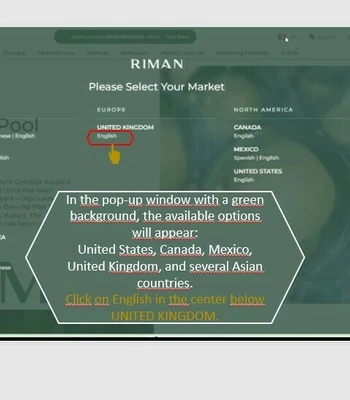
- In the header of the RIMAN website, on the right-hand side, the British flag (Union Jack) and the UK label indicate that you are on the UNITED KINGDOM market. If you do not see this, click on the flag and choose the appropriate market.
- It is important that the country corresponding to your place of residence is displayed!
- In the pop-up window with a green background, the available options will appear: United States, Canada, Mexico, United Kingdom, and several Asian countries. Click on English in the center below UNITED KINGDOM.
- This is a virtual gateway where you can enter the store of a selected country.
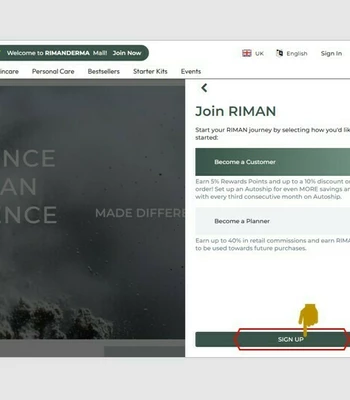
After setting the country, click on the green field labeled “Join Now” in the top menu of the homepage. In the pop-up window, you can then register by entering your personal details:
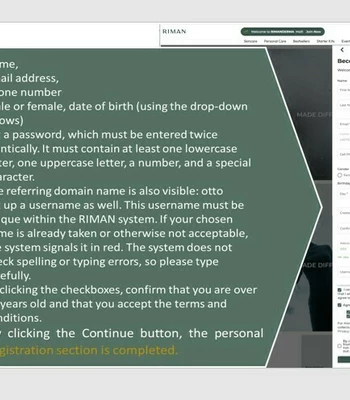
- Name, email address, phone number
- Male or female, date of birth (using the drop-down arrows)
- Set a password, which must be entered twice identically. It must contain at least one lowercase letter, one uppercase letter, a number, and a special character.
- The referring domain name is also visible: otto
- Set up a username as well. This username must be unique within the RIMAN system. If your chosen name is already taken or otherwise not acceptable, the system signals it in red. The system does not check spelling or typing errors, so please type carefully.
- By clicking the checkboxes, confirm that you are over 18 years old and that you accept the terms and conditions.
- By clicking the Continue button, the personal registration section is completed.
If any field is marked in red, it indicates that the entered information is not acceptable to the system for some reason.
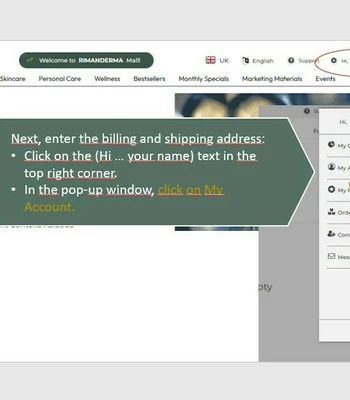
Next, enter the billing and shipping address:
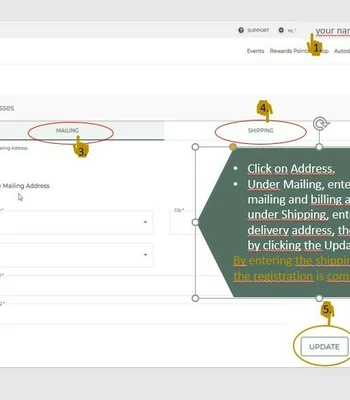
- Click on the (Hi … your name) text in the top right corner.
- In the pop-up window, click on My Account.
- Click on Address. Under Mailing, enter your mailing and billing address; under Shipping, enter the delivery address, then confirm by clicking the Update button.
By entering the shipping address, the registration is complete.
My Office
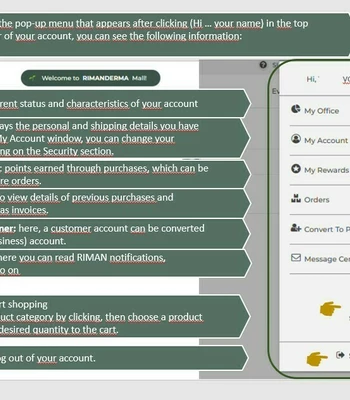
In the pop-up menu that appears after clicking (Hi … your name) in the top bar of your account, you can see the following information:
- My Office: the current status and characteristics of your account
- My Account: displays the personal and shipping details you have provided. In the My Account window, you can change your password by clicking on the Security section.
- My Reward Points: points earned through purchases, which can be redeemed on future orders
- You can also view details of previous purchases and deliveries, as well as invoices.
- Converter to Planner: here, a customer account can be converted into a partner (business) account.
- Message Center: here you can read RIMAN notifications, promotions, and so on
- Shop: you can start shopping
- Select a product category by clicking, then choose a product and add the desired quantity to the cart.
- You can also read the product description here, including benefits, ingredients, and instructions for use.
- Here you can see the loyal customer reward points per product, as well as the total amount payable.
- A one-time purchase is recommended. First, experience how long the product lasts and how often you will need to repurchase it.
- You can continue shopping by selecting another product, or proceed to checkout for payment.
- In the next step, in the pop-up window under Shipping, tick the small checkbox to indicate that the shipping address is the same as the mailing address, or enter a different shipping address.
- In the Select a shipping method field, accept the shipping cost. Shipping is free above a certain order amount, so it is advisable to place fewer, larger orders rather than frequent smaller ones.
- Sign out: always log out of your account.
Next time, you can access your account by clicking the link
https://mall.riman.com/rmnsocial/home, then clicking Sign in and entering your username and password.
 +
+

Back to the previous page!